
Answer: For uncompressed PCM, multiply sample rate, bit depth, channel count and duration, then divide by eight for bytes. Keep compressed audio estimates separate.
On this page
Creator Edit Lab editorial project · Updated October 21, 2026 · Original decision framework and illustrative example. No physical product measurement or hands-on benchmark is claimed.
Why the distinction matters
A WAV extension can contain different encodings, so inspect the actual stream. PCM storage arithmetic counts samples and their representation; it does not establish perceived quality. More channels or a higher sample rate can increase storage even if the spoken content is the same. Container headers add a small amount beyond the pure sample payload.
A practical sequence
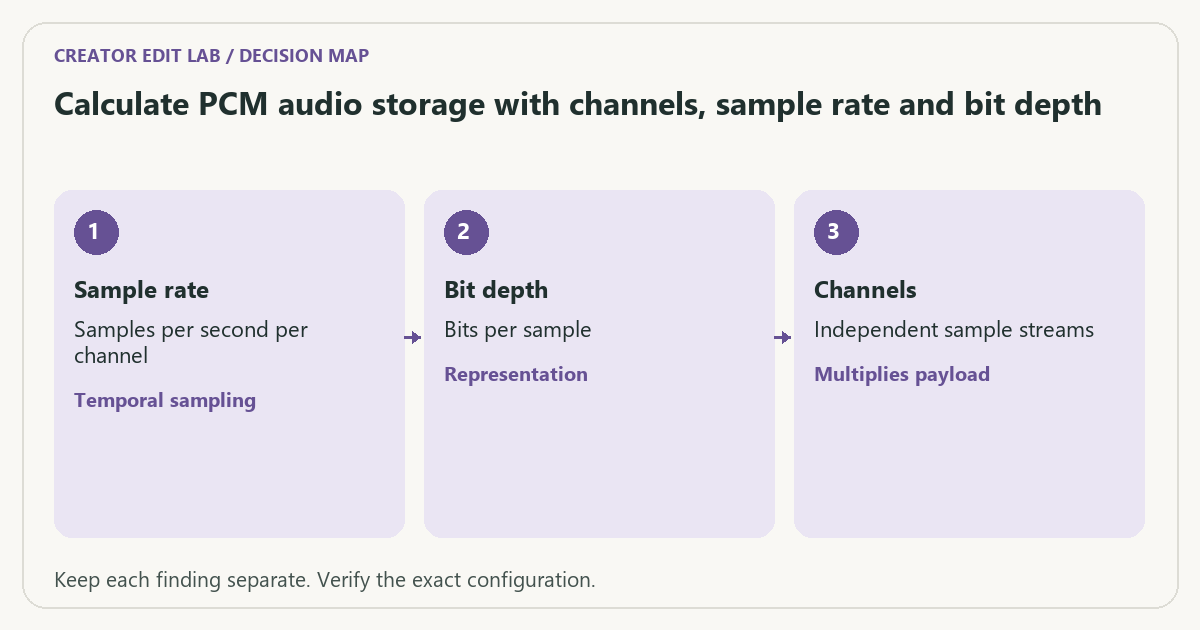
- Confirm the actual audio encoding is the PCM case being modeled.
- Record sample rate in samples per second, bits per sample and channel count.
- Multiply by duration in seconds and convert bits to bytes.
- Compare with a saved sample and keep decimal MB versus binary MiB explicit.
Decision record
| Check | What it means | What to verify |
|---|---|---|
| Sample rate | Samples per second per channel | Temporal sampling |
| Bit depth | Bits per sample | Representation |
| Channels | Independent sample streams | Multiplies payload |
Worked example
Stereo 48,000 Hz, 24-bit PCM for 60 seconds contains 48,000 × 24 × 2 × 60 ÷ 8 = 17,280,000 bytes of sample data, or 17.28 decimal MB. A mono version has half that payload. These are arithmetic sizes, not an audio-quality comparison.
Verify the result
Changing gain or normalizing loudness does not automatically change this fixed-rate PCM payload. Compressed AAC size follows its actual average bitrate instead. Inspect channel routing before exporting a smaller mono file.
Download the editable CSV worksheet · Delivery workbook
Question and answer
Does doubling bit depth double fixed-rate PCM sample payload? With the same duration, sample rate and channel count, the formula doubles the payload. File-container details remain additional.
Sources and scope
- FFmpeg: ffprobe documentation — Read-only stream and format inspection. A metadata report does not prove visual quality.
The decision sequence, diagrams, worksheet and worked case are our editorial work. AI assisted research, drafting and implementation. Official references support the named technical distinctions; examples do not establish real product performance.
Continue the task
- Peak normalization vs loudness normalization
- Distinguish dual mono, stereo and a missing dialogue channel
- Browse the complete resource library
Measured WAV payload and container bytes
We generated a 60-second sine-wave fixture as signed 24-bit little-endian PCM, 48,000 samples per second and two channels. ffprobe reported pcm_s24le, 24 bits per sample, two channels and 60.000000 seconds. The saved WAV measured 17,280,102 bytes. The formula predicts 17,280,000 sample bytes, leaving 102 bytes of container/header overhead in this particular file.
Do not add a universal 102-byte WAV allowance: metadata chunks and format choices change the overhead. Use the stored representation when calculating payload; 24 valid bits packed into a 32-bit storage word are a different storage case from this packed pcm_s24le fixture. The generated tone is a storage test, not an audio-quality comparison.
Inspect the sanitized ffprobe report. The commands below regenerate the WAV locally.
Test record: November 7, 2026. These files were actually generated and inspected with ffmpeg version 9.0.2-essentials_build-www.gyan.dev. They are synthetic fixtures, not camera recordings, visual-quality scores or hardware-speed benchmarks. A different build can produce different byte counts. Commands and SHA-256 checksums · Measured results (JSON).
Build on what you just learned
Your next useful step.
Check channels, loudness and peak headroom.
Resolve 21 subframe audio edits: solve the click without moving the picture
Use fine audio timing when a frame-sized move is too coarse for a click, fade or transient.
Read the guide →
Clean dialogue without making the room pump between words
I would begin with a clean recording and restrained processing, then compare at matched listening level.
Read the guide →