
Answer: Allocate the total size budget across duration, audio and a stated reserve before choosing video bitrate. Then measure the actual exported bytes, especially when the limit is strict.
On this page
Creator Edit Lab editorial project · Updated October 21, 2026 · Original decision framework and illustrative example. No physical product measurement or hands-on benchmark is claimed.
Why the distinction matters
A file limit may use decimal MB or binary MiB, and those quantities differ. Video target bitrate is not the whole file: audio and container data also contribute. Variable bitrate can make the actual result depart from a simple estimate. Start with the recipient’s exact units and whether the limit applies to a single file or the whole package.
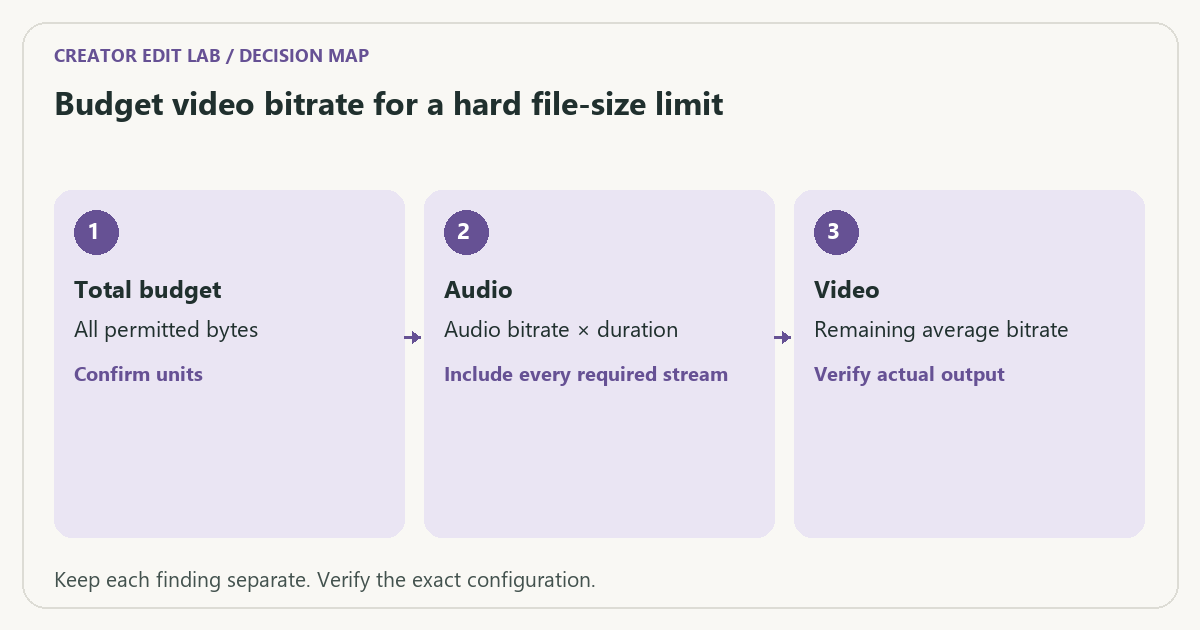
A practical sequence
- Record the limit in bytes or explicitly named MB/MiB and the full delivery duration.
- Choose the required audio rate and an explicit planning reserve.
- Calculate the remaining average video budget and export a representative proof.
- Inspect actual file bytes and revise the rate or encoding approach if needed.
Decision record
| Check | What it means | What to verify |
|---|---|---|
| Total budget | All permitted bytes | Confirm units |
| Audio | Audio bitrate × duration | Include every required stream |
| Video | Remaining average bitrate | Verify actual output |
Worked example
For an illustrative decimal 100 MB limit and 60-second video, total average rate is 100 × 8 ÷ 60 = 13.333 Mbps before reserve. Stereo audio at 0.320 Mbps leaves 13.013 Mbps for video before overhead. Reserving 5 MB first instead leaves 12.347 Mbps. The 5 MB reserve is a chosen assumption, not a universal requirement.
Verify the result
Do not deliver solely from a calculator result when the limit is hard. Check the recipient’s acceptance behavior and retain a usable master before reducing a delivery copy.
Download the editable CSV worksheet · Delivery workbook
Question and answer
Can I use the maximum bitrate as the average in the size formula? Not generally. The formula needs average total rate over time; a peak or maximum setting describes a different constraint.
Sources and scope
- FFmpeg: ffprobe documentation — Read-only stream and format inspection. A metadata report does not prove visual quality.
The decision sequence, diagrams, worksheet and worked case are our editorial work. AI assisted research, drafting and implementation. Official references support the named technical distinctions; examples do not establish real product performance.
Continue the task
- Video bitrate and file size: the calculation behind the estimate
- Why a VBR export can miss your expected file size
- Browse the complete resource library
Build on what you just learned
Your next useful step.
Budget the size, inspect the export, keep a record.
Generative Extend: a few extra frames still need an editorial review
I would use generated extensions for a deliberate transition or timing need, then inspect the new frames and identify them in the project record.
Read the guide →Inspect an exported video with ffprobe: a delivery acceptance check
Generate a local ffprobe JSON report, compare stream properties with a delivery brief and verify the saved video with a reproducible acceptance checklist.
Read the guide →
