
Answer: Compare the intended timeline range with the saved file’s duration and endpoints. A successful export can still contain a short range, an extra tail or black frames from missing content.
On this page
Creator Edit Lab editorial project · Updated October 21, 2026 · Original decision framework and illustrative example. No physical product measurement or hands-on benchmark is claimed.
Why the distinction matters
In/out marks, work areas, sequence selection and empty timeline tails can alter what gets encoded. Start by writing the expected first and last visible moments. Distinguish intentional black from a missing image or unintended gap. Preserve the project before changing its range or deleting clips so the diagnosis remains reversible.
A practical sequence
- Identify the intended sequence and expected delivery duration.
- Inspect the selected export range and the timeline beyond the final intended frame.
- Export a short proof around the beginning and end if the task is uncertain.
- Reopen the saved file and check duration, first frame, final frame and audio tail.
Decision record
| Check | What it means | What to verify |
|---|---|---|
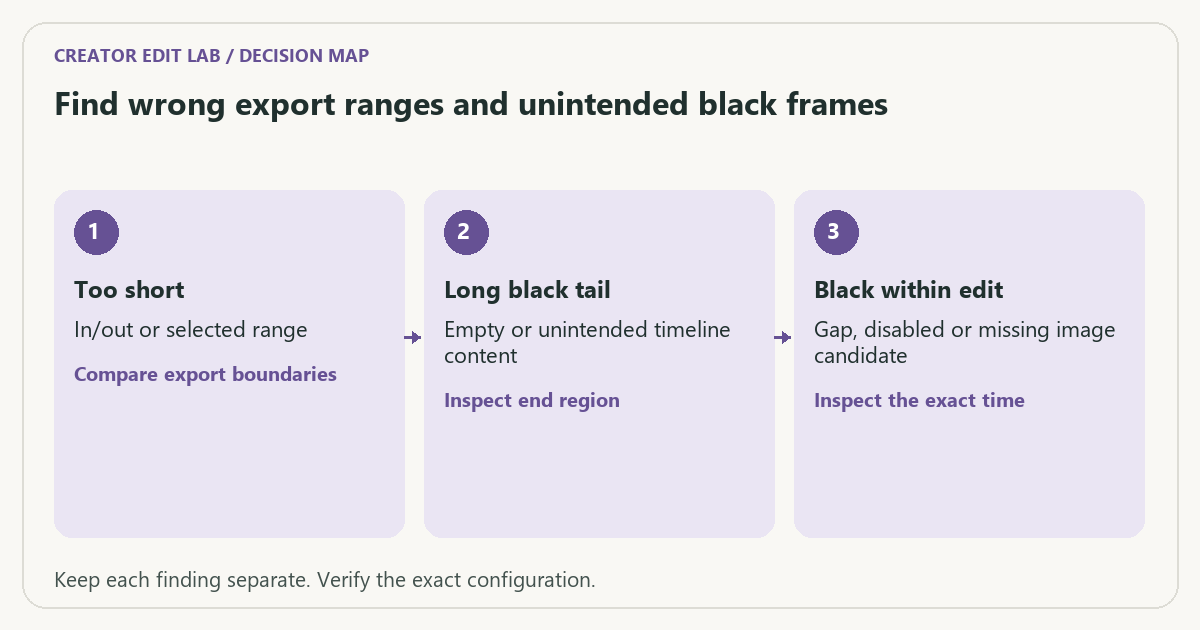
| Too short | In/out or selected range | Compare export boundaries |
| Long black tail | Empty or unintended timeline content | Inspect end region |
| Black within edit | Gap, disabled or missing image candidate | Inspect the exact time |
Worked example
An illustrative 3-minute edit exports as 18 seconds because the export uses a marked range. Changing codec would not resolve that boundary. Another export lasts 3:12 with twelve seconds of unintended empty timeline; the expected duration record makes the error visible immediately.
Verify the result
If an export fails at a reproducible point, duplicate the project and isolate a small region around that time. Change one source or effect variable at a time, keeping the working original.
Download the editable CSV worksheet · Delivery workbook
Question and answer
Can black detection prove a section is an error? No. Black can be intentional. Compare detections with the editorial intent and reference timeline.
Sources and scope
- Adobe Premiere: export settings reference — Export, caption and source options; verify your installed release.
- FFmpeg: ffprobe documentation — Read-only stream and format inspection. A metadata report does not prove visual quality.
The decision sequence, diagrams, worksheet and worked case are our editorial work. AI assisted research, drafting and implementation. Official references support the named technical distinctions; examples do not establish real product performance.
Continue the task
- Export fails at the same frame: isolate the cause
- Relink missing video media without choosing the wrong clip
- Browse the complete resource library
Build on what you just learned
Your next useful step.
Budget the size, inspect the export, keep a record.
Generative Extend: a few extra frames still need an editorial review
I would use generated extensions for a deliberate transition or timing need, then inspect the new frames and identify them in the project record.
Read the guide →Budget video bitrate for a hard file-size limit
Allocate the total size budget across duration, audio and a stated reserve before choosing video bitrate. Then measure the actual exported bytes, especially when…
Read the guide →
